Electron项目中常见问题汇总
环境依赖
Windows
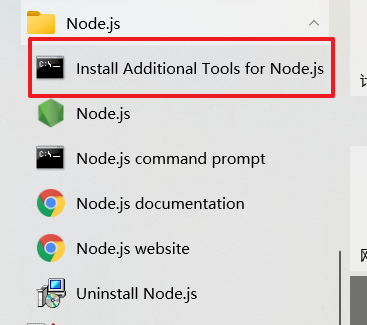
Windows 环境依赖需要 Visual Studio 和 python Visual Studio 和 python 在安装 node 时会提示安装 window 对应的编译环境勾选安装即可, 或使用脚本安装编译环境,也可以使用 npm 全局安装 windows-build-tools
MacOS
MacOS 环境依赖需要 CommandLineTools (Xcode命令行工具)和 python
electron 更新到 12 后提示 Require is not defined
问题
将项目从 electron 6 升级到 electron 12 后,启动项目渲染进程控制台提示:Require is not defined
解决
项目使用 vue-cli-plugin-electron-builder 搭建,在 vue-cli-plugin-electron-builder 的 github 问题上找到对应答案
问题地址:https://github.com/nklayman/vue-cli-plugin-electron-builder/issues/1349
在 new BrowserWindow 中添加 nodeIntegration 和 contextIsolation 的对应配置
const win = new BrowserWindow({
  // ...
  webPreferences: {
    // Use pluginOptions.nodeIntegration, leave this alone
    // See nklayman.github.io/vue-cli-plugin-electron-builder/guide/security.html#node-integration for more info
    nodeIntegration: process.env.ELECTRON_NODE_INTEGRATION,
    contextIsolation: !process.env.ELECTRON_NODE_INTEGRATION,
    // ...
  },
});
同时修改 vue.config.js
官方说明:https://nklayman.github.io/vue-cli-plugin-electron-builder/guide/security.html#node-integration
module.exports = {
  //...
  pluginOptions: {
    electronBuilder: {
      nodeIntegration: true,
      //...
    },
  },
};
fs.existsSync is not a function
使用 vue-cli-plugin-electron-builder 的项目修改主进程和渲染进程入口文件
修改 vue.config.js
module.exports = {
  //...
  pluginOptions: {
    electronBuilder: {
      mainProcessFile: "src/main/index.js",
      rendererProcessFile: "src/renderer/index.js",
      mainProcessWatch: ["src/main"],
      //...
    },
  },
};
使用 ipcRenderer.sendSync 进程通信后程序卡住(阻塞)问题
使用 ipcRenderer.sendSync 方法进行通信 ,对应的 ipcMain.on 中必须使用 event.returnValue 返回结果
否则 sendSync 会将阻塞整个渲染进程 ,导致程序卡住
官方文档中的警告
⚠️警告:发送同步消息会阻塞整个渲染器进程,直到收到回复,所以只能作为最后的手段使用此方法。使用异步版本要好得多,
invoke().
所以尽量使用 ipcRenderer. send 而非 sendSync 方法, 或者再每个 ipcMain.on 中都添加返回值 event.returnValue ,但是如果操作中报错可能还会导致卡死(阻塞)
建议
如果只需要让主进程执要返行一些操作不需要返回值 就使用 ipcRenderer.send 和 ipcMain.on 组合
如果需要主进程返回值 就使用 ipcRenderer.invoke 和 ipcMain.handle 组合
ipcRenderer.sendSync 在任何情况下都不使用
electron+vue 项目添加 vue-devTools Unrecognized manifest key ‘browser_action‘. Permission ‘contextMenus‘
构建 vue-devtools
手动 clone 项目vue-devtools
git clone https://github.com/vuejs/vue-devtools.git
然后切换到add-remote-devtools分支,默认的是main分支:
git checkout add-remote-devtools
进入vue-devtools根目录:
yarn
# ...
yarn run build
run build
这一步会出现一个特别恶心的 webpack,webpack-cli 互相依赖缺失的问题,提示没有 webpack 模块,然后全局安装 webpack 模块,npm install -g webpack,这时候运行 webpack 指令,会发现缺失 webpack-cli,再次全局安装 webpack-cli,npm install -g webpack-cli,这时候运行 webpack-cli 指令,又莫名其妙的提示缺失 webpack 模块。
原因就是 webpack4.0 的问题,解决办法就是安装指定版本的 webpack:npm install -g webpack@3.6.0,而不是默认,默认会出现 4 以上版本,甚至 5.1 版本或者更高。
但是有的系统如果以前全局安装过 webpack,还是会报这些相互依赖的问题,或者是环境变量导致的 webpack,webpack-cli 安装进了 node 目录,而以前有的 webpack 安装进了 C:\Users\Administrator\AppData\Roaming\npm 这个目录。解决办法就是删除 C:\Users\Administrator\AppData\Roaming\npm 目录下的 webpack。
修改代码
然后将 build 生成的 shells 目录中的 chrome 目录拷贝出来,这个就是 build 生成的 vue-devtools 插件 浏览器安装容易,直接打开插件管理,切换开发模式,加载已解压插件,选择刚刚的 chrome 目录就行了。但是 electron 项目中安装会有点麻烦:
找到 background.js 文件 (如果没有 background.js 找到 main/index.js),找到这段代码:
app.on("ready", async () => {
  if (isDevelopment && !process.env.IS_TEST) {
    // Install Vue Devtools
    try {
      await installExtension(VUEJS_DEVTOOLS);
    } catch (e) {
      console.error("Vue Devtools failed to install:", e.toString());
    }
  }
  createWindow();
});
这个是默认安装vue-devtools部分,不过因为网络(墙)问题,安装不上:
Failed to fetch extension, trying 4 more times
Failed to fetch extension, trying 3 more times
Failed to fetch extension, trying 2 more times
Failed to fetch extension, trying 1 more times
Failed to fetch extension, trying 0 more times
Vue Devtools failed to install: Error: net::ERR_CONNECTION_TIMED_OUT
所以要修改一下:
app.on("ready", async () => {
  if (isDevelopment && !process.env.IS_TEST) {
    // Install Vue Devtools
    try {
      // await installExtension(VUEJS_DEVTOOLS);
      // 新增的:安装vue-devtools
      const { session } = require("electron");
      const path = require("path");
      session.defaultSession.loadExtension(
        path.resolve(__dirname, "../../vue-devtools/chrome") //这个是刚刚build好的插件目录
      );
      //这个是刚开始找的方法不行,换上边的方法
      // BrowserWindow.addDevToolsExtension(path.resolve(__dirname, "../../vue-devtools/chrome")  );
    } catch (e) {
      console.error("Vue Devtools failed to install:", e.toString());
    }
  }
  createWindow();
});
提示
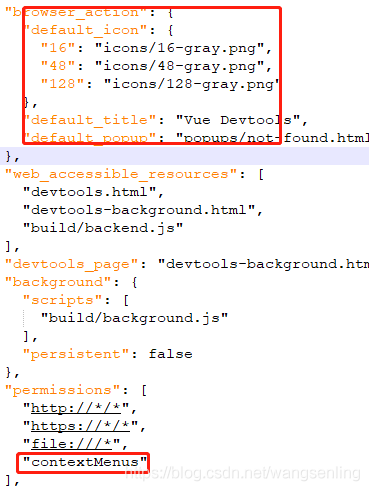
(node:9068) ExtensionLoadWarning: Warnings loading extension at ...\vue-devtools\chrome: Unrecognized manifest key 'browser_action'. Permission 'contextMenus' is unknown or URL pattern is malformed.
解决: 在 vue-devtools/chrome/manifest.json 删掉相应的字段
问题
报 Cannot read property ‘VUE_DEVTOOLS_UID’ of undefined
在 main.js 中加入如下代码即可:
Vue.config.devtools = true;
打包出来的 vue-devtools 可能是最新版的外观可能不太适应
直接在 github 官方地址 https://github.com/vuejs/devtools/tags下载自己用的比较顺手的版本
我比较喜欢 v5.3.3
然后相同的方法 构建 复制 粘贴就行
MacOS 系统更新后 下载依赖报找不到 xcode
MacOS 下打包 electron 项目需要 xcode ,同 windows 一样 (win 需要 visual studio),但是 xcode 太大了而且一般不需要整个 xcode ,这时可以使用命令行工具(Command Line Tools, CLT),同样 win 也可以通过 node 进行配置命令命令行工具(在 node 安装时可以选择这些依赖)
但是: MacOS 系统更新后 CLT 需要重新下载 ,不然下载依赖时会报找不到 xcode 的错误
MacOS 提示 Error: Cannot create BrowserWindow before app is ready at I.init
原因
应用还在加载中就点击了一下 触发了 app.on("activate") ,同时触发了 new BrowserWindow 此时 app 还没到 ready
app.on("activate", () => {
  // On macOS it's common to re-create a window in the app when the
  // dock icon is clicked and there are no other windows open.
  if (BrowserWindow.getAllWindows().length === 0) createWindow();
});
解决
多加一个判断条件 isReady 开始为false 在 ready 时设置为 true
if (BrowserWindow.getAllWindows().length === 0 && isReady) createWindow();
MacOS 12.3 打包报 Exit code: ENOENT. spawn /usr/bin/python ENOEN
原因
因为 macos monterey 12.3 删除了 python 2.7 https://developer.apple.com/documentation/macos-release-notes/macos-12_3-release-notes
解决
https://github.com/electron-userland/electron-builder/pull/6789
将electron-builder升级到最新
npm i electron-builder@next
注意:如果项目中使用的是vue-cli-plugin-electron-builder 需要手动进入包内部更新
# 进入 node_modules
 cd node_modules/vue-cli-plugin-electron-builder
# 更新 electron-builder
npm i electron-builder@next
vue-cli使用vue-cli-plugin-electron-builder插件,运行时不启动electron程序
原因
当一个项目有yarn.lock但是电脑运行环境没有yarn环境时,就会出现启动不了electron程序的情况 vue-cli使用vue-cli-plugin-electron-builder插件,运行时不启动electron程序
解决
删除yarn.lock 或者使用 yarn 装包
常用文档汇总
electron https://www.electronjs.org/
打包
electron-builder https://www.electron.build/
框架集成
vue-cli-plugin-electron-builder https://nklayman.github.io/vue-cli-plugin-electron-builder/